




Finish your profile right here and directions for adding your Profile Picture (which appears when you post) is right here.

Log Haulin
Members
-
Joined
-
Last visited
Everything posted by Log Haulin
-
Sabin has Bama getting better every week. The GOAT should never be over looked. What he is doing down there this year might just be the best coaching of his career. Being a Duck fan, saying Ducks are the scariest team to play hold no weight. I am not a Bama fan and I would not want to play the Tide right now. Except I do because I want the Ducks to play the best teams, but thats beside the point. Bama/UGA in SEC title game could sink the Ducks playoff hopes. Not sure UGA can beat Bama. 1 loss conf champ Alabama and a 1 loss Bulldogs makes things complicated for Oregon. Need Mich to lose to PSU Saturday and get rolled by tOSU. Need Miami to catch lightning in a bottle this weekend. And the Ducks need to dismantle the rest of the pac and then destroy a 12-0 Fusky.
-
Ya know, Grinch was an excellent DC at WSU. Maybe Grinch isn't the problem. Lincoln Riley is the HC, he has charge of the offense, defense and special teams. Is Riley the problem? We should know in the next couple years.
-
2 plays in the Cal game that stood out and makes Cowherds statment legit IMO. I am going off of memory from Saturday so I don't remember all the details. 1. The play Bo was working out to the right, ducked under the rusher and threw a dime to Holden(?). That one got me out of my seat. What a great play. 2. Bo was droped back in the pocket. Pocket started to collapse on the backside. Bo intelligently and patiently worked his back into and through the pocket as it was tightening around him. These are two of the best QB plays I have seen Bo make. The way he worked that pocket on #2 is a play very few QBs can make. Caleb made the same play later that night v. Fusky. Add in his ability to OC from the LOS and Bo is the best QB in the country right now.
-
AZ cracked the top 25. Good to see them get the love, they earned it
-
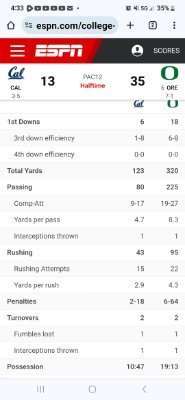
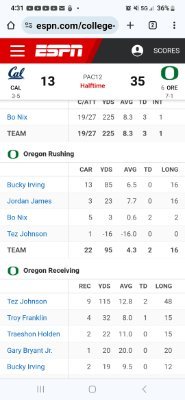
... and Ducks were going to be left behind in irrelevance...SC is a 14 point dog v. DucksThere is a lot to unpack in this article. Its a great article. Had to have been tough to write with all the side stories played out in one game. My thoughts on the refs is that the Ducks seem to be on the losing end of these horrendous performances by Pac-12 officials. Almost seems like dirty pool. But I am a Ducks fan so my vision could be slanted. Maybe the Ducks are so good, make it look so easy that the refs figure there has to be cheating somewhere in there. So they just throw a flag and work it out in a group chat on the left hash. Hitting a player on the ground? Now thats one for the ages.I hope they beat the Noles. Thats a double win for Ducks fans. Knock out FSU and secure another couple years of laughing at the U.I think Thompson is capable of leading this team. He has a huge arm and good legs. He has looked good in his limited snaps. Poised and in control of the offense. Mostly, the guy is begging to be out there. Before, he looked afraid to be out there. Vs Utes he was begging for them to let him throw the ball. Ty went 6/8 with a TD and a QBR of 92. He had a good night that will only build on his confidence. The thing that TT will face thats almost imposible is he will be following up Nix if he wins the starting job. Add the fact that a lot of people feel the same as CF and QQ. This kid might not stand a chance. Talk about bad luck. Ty gets developed by Mariø then might have to follow up Nix. Lose/lose! Ty just might get a hard lesson, just because he showed loyalty doesn't mean others (Lanning to be specific) will or should show loyalty back. This is big time football. Just brutal if it plays out this way. IMO, Ty can be the man. I think he has all the skill needed and it looks like he is hungry finally. He has another off season to get better and win the job. I think he will do it.4th and 1 and Williams throws a dime into the endzone. Wow!That little duck and shot was pretty crazy. Favorite play of the gameLots to clean up. TOs and penalties. Can't take those into next week. Another dominant performance. Tez was fire.98 penalty yards. Ouch!Cal has done a great job defending the run. Got shredded by Nix though.Hope they work on tackling this week. Not a poor performance but needs some work.Cal runs for 43 yrds first half. 80 in the air.35 at the break, thats a lot of points.Tez has redeemed himself for surePublic service announcement. Riminder about Charles game day chat rules. They didn't get posted here. This is an ugly game so lets make sure the moderators can watch it to. 👌And a fumble.This game is slowing down way too much. Refs need to put the laundry away. On pace for a 4 hr gameTez is having a good game. 73 yds in 15:00 and a TD









Account
Navigation
Search
Configure browser push notifications
Chrome (Android)
- Tap the lock icon next to the address bar.
- Tap Permissions → Notifications.
- Adjust your preference.
Chrome (Desktop)
- Click the padlock icon in the address bar.
- Select Site settings.
- Find Notifications and adjust your preference.
Safari (iOS 16.4+)
- Ensure the site is installed via Add to Home Screen.
- Open Settings App → Notifications.
- Find your app name and adjust your preference.
Safari (macOS)
- Go to Safari → Preferences.
- Click the Websites tab.
- Select Notifications in the sidebar.
- Find this website and adjust your preference.
Edge (Android)
- Tap the lock icon next to the address bar.
- Tap Permissions.
- Find Notifications and adjust your preference.
Edge (Desktop)
- Click the padlock icon in the address bar.
- Click Permissions for this site.
- Find Notifications and adjust your preference.
Firefox (Android)
- Go to Settings → Site permissions.
- Tap Notifications.
- Find this site in the list and adjust your preference.
Firefox (Desktop)
- Open Firefox Settings.
- Search for Notifications.
- Find this site in the list and adjust your preference.