Finish your profile right here and directions for adding your Profile Picture (which appears when you post) is right here.

Everything posted by Log Haulin
-
Ohio State battling Missouri, Oregon for 4-star WR commit Jeremiah McClellan WWW.ON3.COM Ohio State landed one of its top recruiting targets in four-star wideout Jeremiah McClellan...
-
Wow! I watched the first half but could no longer keep my eyes open to had to go to bed. My day started at 1:45 a.m. I was shocked to see the score this a.m. first half, tree looked horrible and colorado was up big. I watched Sanders presser. Humility goes a long way with me. I thought Sanders did a great job of taking ownership. We will see how they respond after things go right after this one. If coach truly is looking to be a great coach, this could be one of the best things to happen to him. Teams take on the persona of thier HC. Sanders has a tremendous amount of power. It seems he recognized that. Colorado believed their own hype. Losing to Tree should slap them back to reality. Sanders needs to be lead dog in showing that humility and get back to work. Seems he had a good start in that presser. My view is slowly changing about what I see in him. I hope it continues. Not that my opinion matters. I think if Colorado makes a bowl game, the short term will seem like a blessing to this program. If they just miss on the bubble? Imo, the long term effect will be a much bigger blessing to the Buffs program. I will continue to root against this team for now. But coach Sanders has dampened the vigor on how enthusiastic I am to root against them. In my opinion, this is a benchmark loss for Colorado. Now is when Sanders statement "this is the worst we will be" might ring true. And it just might be a great moment in Colorado getting to respectability.
-
Putting it out in the ethos. 😎
-
OK... to everyone picking washington to win... if you actually pick right you win nothing... zero... zilch! So stop it!
-
Did anyone see Lockrd on Ducks host Spencer picked Fusky. In front of 2 Fusky fans. Dude! WTH. I question the level of fandom Spencer has. This is unacceptable.
-
I will drink coffee in the a.m. post some takes here. Probably go troll some fusky fans. Watch some football Troll my brother lightly. He is a die hard fusky. Followed his crappy team into every Pac-12 stadium. Then I am going to watch every minute of the Duck game stone cold sober. My dog will go hide in another room like every week. I am compleatly jacked up already. I love these feelings these big games give. It's the climax of every week. I live to watch football.
-
This is a question absent from the conversation many so called "experts" are having. Oregon is just as capable of boat racing Fusky and UW is Ducks. Maybe more capable. Az was giving Husky fits on both sides of the ball. And as a result, Husky was starting to lose composure. Even with the lead I don't know that Husky, mentally, can play from behind. If Oregon gets up I think fusky could break down. If that happens, better keep your head cuz husky will play some dirty pool
-
C'mon DJ-PP. The edit button works pretty good
-
I agree, Evan Williams is my dude. I love the way he plays. It's obvious he loves the game and is having a blast. He also has a chip on his shoulder with his brother getting lit up last year. Oregons LB group is also pretty quick. It will be interesting to see how Jestin Jacobs adapts to the game with so much time down. Oregon has a lot of options with many high IQ fast players. I am sitting here, broke down in the brush waiting on parts. This thread has me super jacked. Cant wait. Less than 28 hrs till kick off.
-
Another match up to look out for, much like the Taki/Popo v. Brailsford matchup, is Conerly Jr v. Trice/ZTF. Conerly is only a true sophomore. What is he 19? Trice and ZTF are what? 22-23 yo Dudes that have been in a college weight room for awhile. JC is a talent for sure. But he is young. I think Josh holds his own but probably gets schooled a few times. Going to be interesting how this one plays out. I am sure Fusky brings the heat with blitze pkg to Conerlys side of the ball. Try and get his head swimming a bit. Get him making mental mistakes. The pre-snap mistakes JC was prone to have got to be fixed. Watch the holding as well, Debore is going to prime the refs before KO for sure. Tuli is a pretty good player too. I think Ducks interior is 🔥. So I think Oregon wins most of those battles. They can't sleep on Tuli or Nix will be on his back. Pretty sure the potential damage done by Fusky talented front will be minimized and schemed. Going to be some great matchups for sure. There is a reason beyond Penix and 3 receivers as to why UW is #6
-
I agree, but it won't take much. I don't think Nix needs to use this legs right out of the gate. Kinda wait and see what the D is giving them thing. I think they spy Nix. That will take away a defender and open up the rpo a bit. But even a couple designed runs for Nix will put fusky D on their heels. I also think Stein needs to give the decision to run entirely to Nix. Husky has shown they are willing to submarine Nix lower body. He has to stay out of harms way imo. There is a lot of football left after this one Oregon's offense is good enough to score at will v. Fusky D. I don't think Ducks need to get cute. Just run the offense and trust your D to come up big a couple times.
-
KJ is going to have to play on an island all game. I agree, I think he is very capable. Kind of a sleeper is o-line, tackle on both sides. But especially JC. His play will be a huge factor in this game. Looking for him to be the silent assassin.
-
-
Ducks 45-35 1 3 328
-
Oregon is playing one of the biggest conference games played in years. Ranks up there with the UO/osu for the rosebowl in 2009. I was thinking about this Oregon team today and what it will take to pull off a victory on Mont Lake. Got me thinking about who might come up big and leave us with great memories of this game. Defensively I think Evan Williams is going to have a monster game. Lead the team in tackles, get atleast 1 sack and come up with a sneaky pick. I think Williams has something to prove to his old coach. Offensively I am looking at Jordan James. 110ish+ rushing yards and 2 scores. I do think Bucky eclipses James in all purpose yards but James production with Noah out will be a game changing stat line. What do you guys think about who could put up a game altering performance and seal a victory for OBD?
-
This will not be a clean game imo. There will ne some dirty play and it's most likely to get chippy. Oregon needs to keep cool. But a man can only take so much. Hopefully Lanning can keep his guys to understand that.
-
Five prospects that will be paying close attention to Washington-Oregon N.RIVALS.COM Four-star offensive lineman Isendre Ahfua committed to Texas A&M in August but the...
-
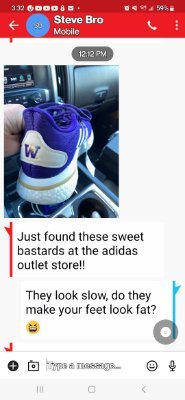
Here is a text exchange between my brother (fusky fan) and I.
-
I have listened to a lot of Husky podcasts this week. Coupled to these comments, I would say that Fusky fan is pretty ignorant about the team in Eugene.
-
All well and good, but when asked, he lied. If someone lies to me I am done. It's Just the way I am.
-
Ducks recruit all over the nation. Pulling guys from Texas, Florida, Alabama... Less games in LA shouldn't be an issue. Media today covers just about any team you want to watch. If anything, joining the B1G expands Oregons footprint from LA to NYC. Less and less, recruiting comes down to location. It's a much smaller world than the stone age of 1985. "Say what you want about Mario coaching...". I am sure Mariø will give us plenty of opportunity in the future. MC was shady in the way he left Oregon. Many of us take great joy in mocking his enormous blunders.
-
Bassa is a beast, stacked! Love the uni. Let's get it on!
-
IMO if possible, send the defense out first and smash Fusky in the mouth. Ornery and mean. Continue it till the last play of the game. Leave them battered and bruised and make a statement to the Pac that this will be different than what they have been used to. Leave no doubt that if you choose to challenge the Ducks you will pay a heavy price. Offensively, just go do your thing. Your really good and well coached. You have some of the best skill players in college football and an O line that might be better than last year. I am feeling more aggressive the closer we get to this game. Compleatly jacked for this deal to go down.
-
I like it when Dans salty. Rubs off on the team and makes the team salty. I want Oregon to play with a nastiness to them. After this Saturday, the rest of the teams on Duck schedule need to fear the Ducks.
-
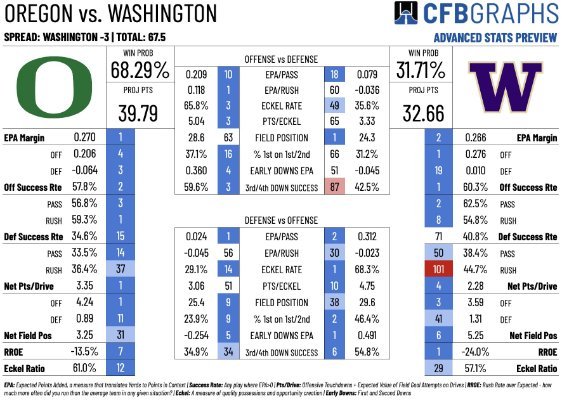
I found this interesting. I don't understand some of it. Maybe some of you guys do and find it interesting to discuss.